Your Pocket Controller: What You Need To Know
Understanding Your LVAD Pump Controller
Hover over the different parts of the controller to see what they do!
Front
Back
Switching to Your Backup Pocket Controller
Replace the running Pocket Controller with your backup Pocket Controller
IMPORTANT: the ability to successfully change Pocket Controllers may be affected by factors that change over the course of LVAD support, and therefore should be periodically reassessed by your physician.
You will need:
A Caregiver to Assist You
you may get dizzy if the pump stops briefly while changing to your backup
Single Available Power Source
Your Backup Pocket Controller
keep within arm’s reach
Please read through all steps thoroughly before beginning replacement!
Step 1: Set-Up
A. Place the back up pocket controller within reach
B. Ensure the patient is sitting or laying down, as he or she may get dizzy if the pump stops briefly
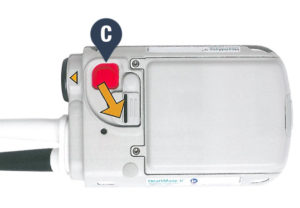
C. Unlock the driveline safety tab on the running Pocket controller (please see image below)
Step 2: Replace Pocket Controller
Multiple power sources available: have power module or MPU, and batteries & clips.
A. Move the white connector’s power source from the running connector to the backup Pocket Controller
B. Promptly move the driveline from the running controller to the backup controller (please see the images below)

C. Ensure that the green pump running symbol  on the backup controller is illuminated
D. Move the black connector’s power source from the running Pocket Controller to the backup Pocket Controller
Step 3: Finishing Up
A. Put the old/replaced Pocket Controller into “sleep mode” by disconnecting from the power source and pressing & holding the battery button for 5 seconds.
B. Do not use the old/replaced Pocket Controller ever again. For instructions on requesting a new Pocket Controller and for instructions on returning the old one, please contact your hospital.